 Ελληνικά
  English
 AzuraCast: Ζωντανή εκπομπή με BUTT ή Mixxx
19813 προβολέςΣτο AzuraCast, οι ζωντανές εκπομπές γίνονται με λογαριασμούς Streamer/DJ. Τους φτιάχνεις μέσα στο AzuraCast. Η μετάβαση από το AutoDJ στον DJ και πίσω γίνεται ομαλά, χωρίς διακοπή για τους ακροατές.
Συνδέεσαι στο AzuraCast με Σύνδεση στο Panel από τη σελίδα της υπηρεσίας (δες AzuraCast: Τα πρώτα βήματα).
Πριν ξεκινήσεις
- Στις ρυθμίσεις του σταθμού (Edit Profile) πρέπει να είναι ενεργό το Enable Streamers. Αν δεν το βλέπεις ενεργό, στείλε μας αίτημα υποστήριξης.
- Φτιάξε λογαριασμό για κάθε DJ στη σελίδα Streamers/DJ Accounts.
Τα στοιχεία σύνδεσης
Όλα τα στοιχεία για το πρόγραμμα εκπομπής (Server, Port, Mount Name) τα βλέπεις στη σελίδα Streamers/DJ Accounts του AzuraCast. Χρησιμοποίησέ τα ακριβώς όπως εμφανίζονται.
BUTT
Το BUTT είναι δωρεάν, για Windows, Mac και Linux. Εκπέμπει με Icecast ή Shoutcast.
Με Icecast (προτείνεται)
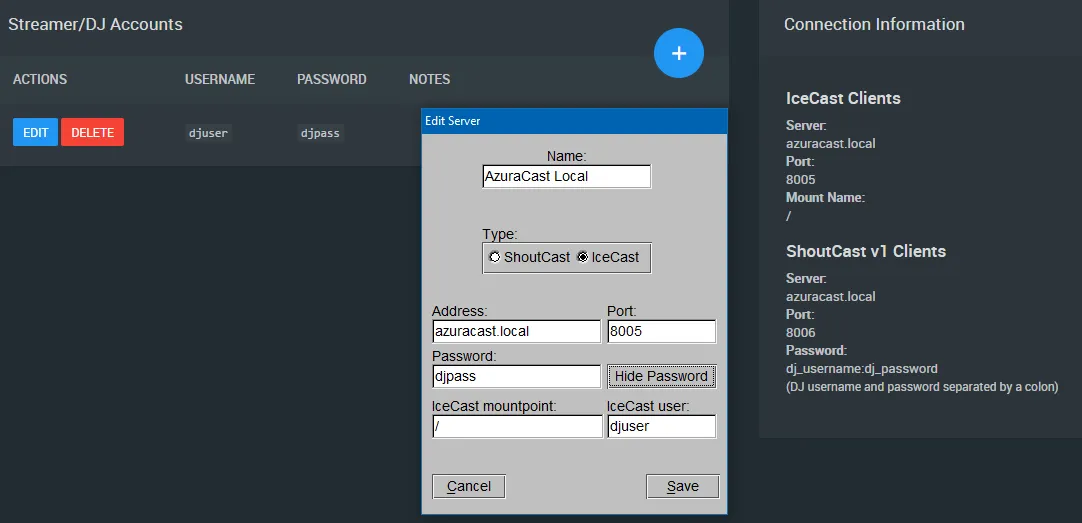
- Στο BUTT, στις ρυθμίσεις server (Settings → Server Settings), πρόσθεσε νέο server με Type = Icecast.
- Στο Address βάλε την τιμή Server από το AzuraCast, και στο Port την τιμή Port.
- Στο Icecast mountpoint βάλε την τιμή Mount Name (συνήθως
/). - Στο Icecast user και στο Password βάλε το όνομα χρήστη και τον κωδικό του DJ.
Με Shoutcast
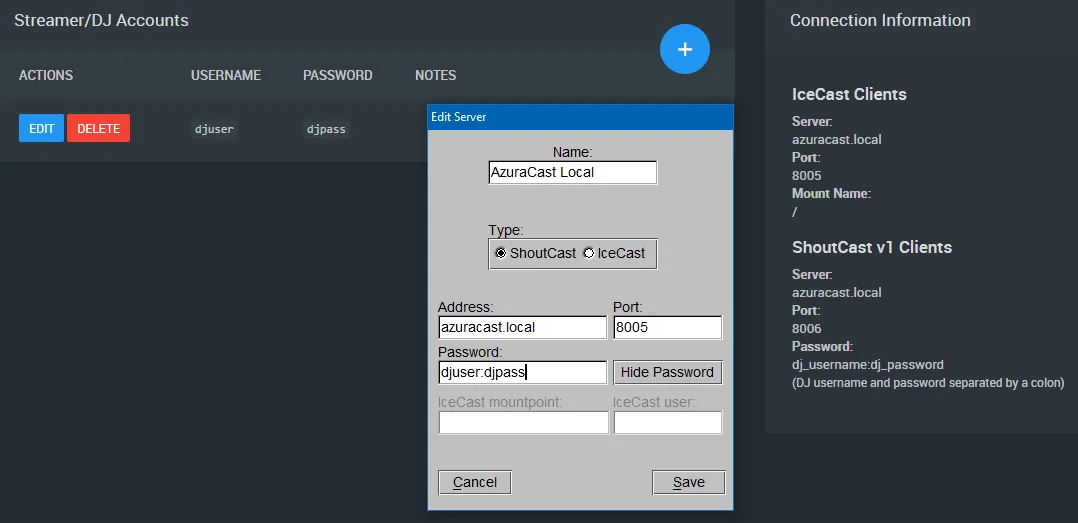
- Το BUTT προσθέτει αυτόματα 1 στη θύρα όταν είναι σε Shoutcast. Γι' αυτό βάλε τη θύρα που γράφει η ενότητα IceCast Clients.
- Το Shoutcast v1 δεν έχει πεδίο για όνομα χρήστη. Στον κωδικό γράψε
όνομαχρήστη:κωδικόςτου DJ, ενωμένα με άνω και κάτω τελεία.
Mixxx
Το Mixxx είναι δωρεάν πρόγραμμα DJ που εκπέμπει και ζωντανά.
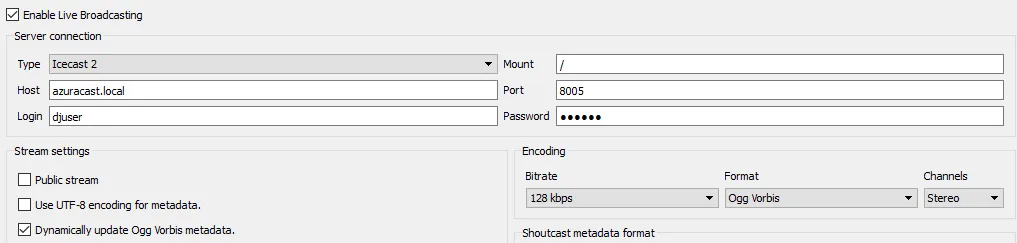
- Οι ρυθμίσεις εκπομπής είναι στο Options → Preferences.
- Διάλεξε τύπο Icecast 2.
- Το Mixxx δεν έχει από μόνο του encoder MP3, αλλά δεν χρειάζεται: βάλε μορφή Ogg Vorbis και το AzuraCast τη μετατρέπει στη μορφή του σταθμού.
Εγγραφή των ζωντανών εκπομπών
Το AzuraCast μπορεί να γράφει τις ζωντανές εκπομπές των DJ. Η εγγραφή ενεργοποιείται στις ρυθμίσεις του σταθμού (Edit Profile), όπου διαλέγεις μορφή και bitrate. Τις εγγραφές τις κατεβάζεις από το Broadcasts, δίπλα σε κάθε DJ στη σελίδα Streamers/DJ Accounts.
Περισσότερα στον οδηγό του AzuraCast για προγράμματα εκπομπής (στα αγγλικά).