 Ελληνικά
  English
Centova Cast
Centova Cast: DJ account for live broadcasting
15108 viewsWith a DJ account in Centova Cast, you or your presenters can broadcast live on your station, each with their own username and password.
Creating a DJ account
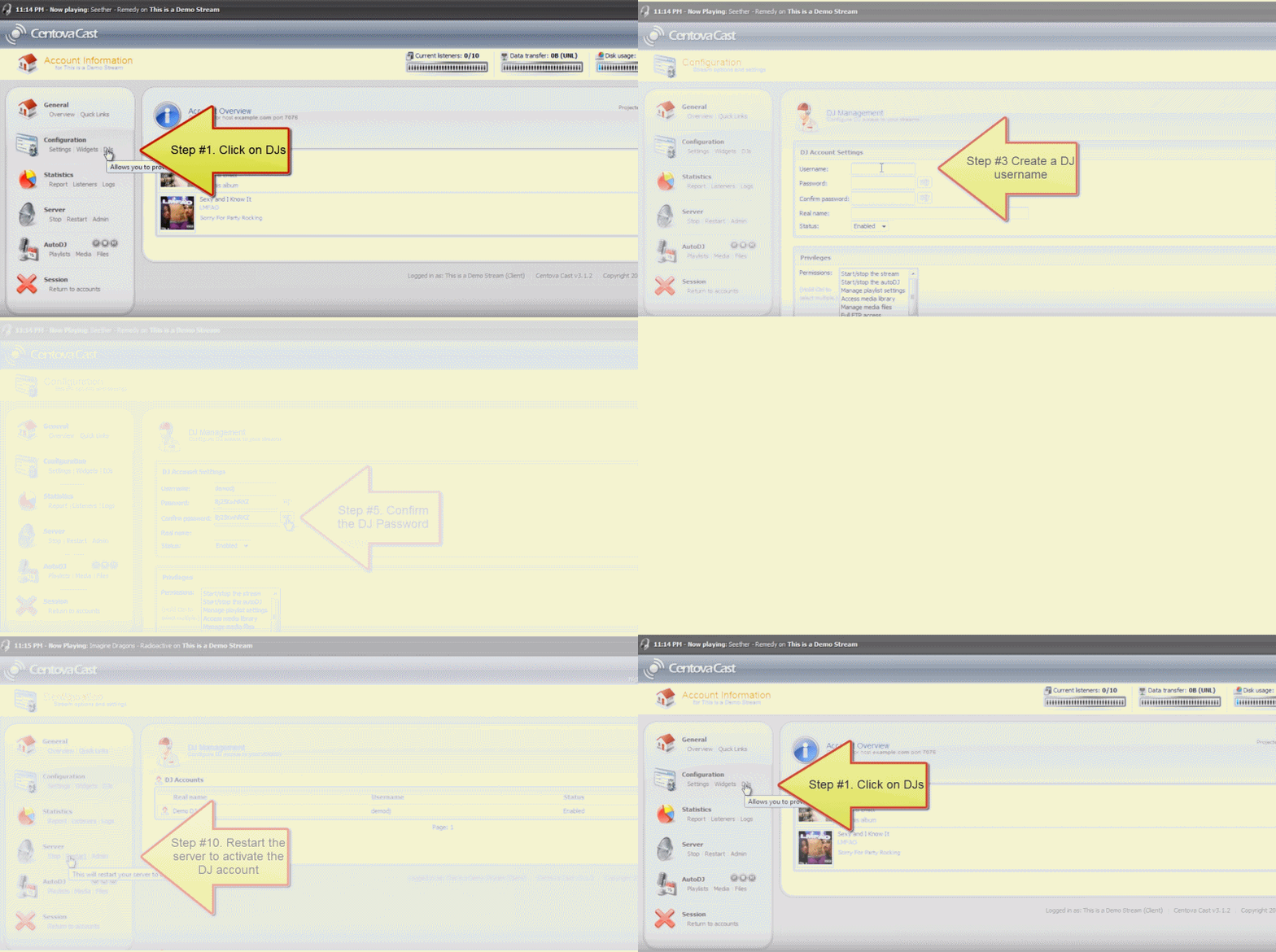
Log in to Centova Cast with Login to Panel on the service page (see Centova Cast: First steps). The picture below shows the steps for creating a DJ account.
The password for live broadcasting
In your broadcasting software (e.g. BUTT, RadioBOSS, SAM Broadcaster), the password you enter is the DJ's username and password joined with a colon:
username:password
Example: if the DJ's username is nikos and the password is Abc12345, the broadcasting password is nikos:Abc12345.
The settings in your broadcasting software
| Field | What to enter |
|---|---|
| Server / Address | Your station's Hostname. |
| Port | Your station's Port + 2. Example: if the Port is 8000, the DJ enters 8002. |
| Password | The DJ's username:password. |
You can see the Hostname and Port on the service page, in the Streaming section.
Tips
- Create a separate account for each DJ. That way, if someone stops working with you, you only delete their account.
- Don't give DJs the Centova Cast password from Login credentials. It gives full access to your station.
Was this answer helpful?
8 out of 25 found this helpful